
OMMPLANNER · MEASUREMENT PLANNING
Plan your measurement before you go on site
OmmPlanner is Ommatidia’s 3D measurement planning software for Q-series instruments. Position instruments around your structure, compare viewing directions and explore the surfaces you can measure before going on site.
Try Lite in your browser. Sign in to use Web.
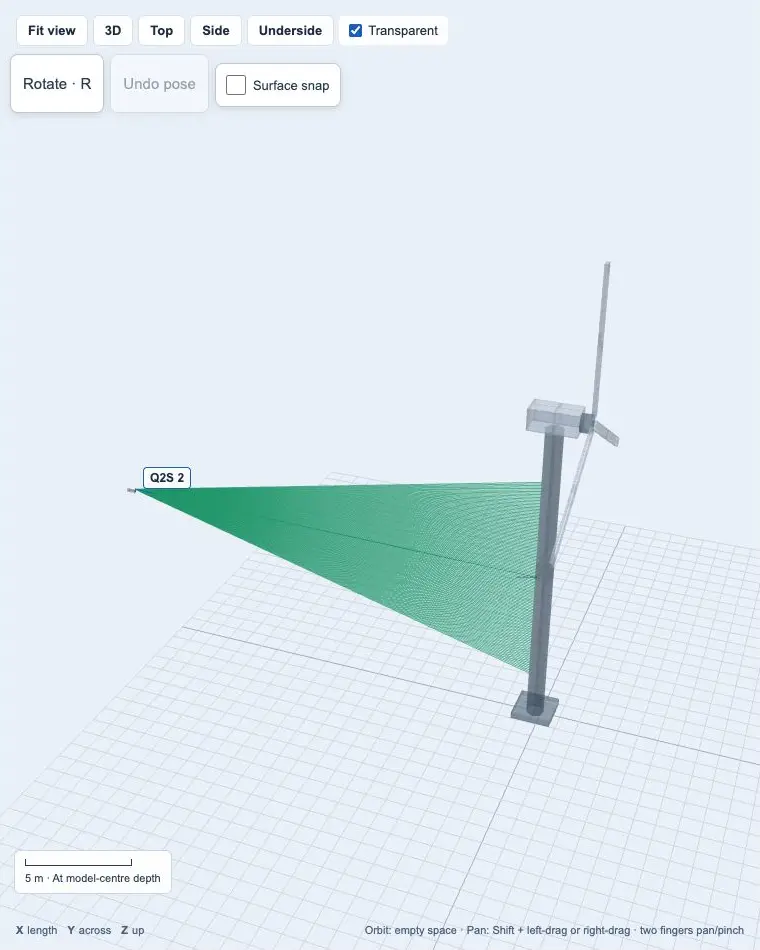
From a 3D model to a measurement setup
Choose your structure, arrange the instruments and compare coverage. In Web, save your setup as a local plan and share a report with your team.
Explore your geometry
Import STL or OBJ geometry, or start with a built-in application model.
Compare positions
Adjust instrument positions and viewing directions to cover the surfaces you need.
Keep your plan
Use Web or Pro to save your setup, reopen it and share a planning report.
Choose your OmmPlanner edition
| Capability | Lite | Web | Pro |
|---|---|---|---|
| STL / OBJ geometry and manual placement | ✓ Up to 1000 triangles | ✓ Detailed geometry | ✓ Detailed geometry |
| Instrument arrangements | ✓ Up to 4 instruments | ✓ Up to 16 systems | ✓ Multi-station planning |
| Colour-coded analysis | ✓ Distance | ✓ Distance and signal | ✓ Coverage and signal |
| Optical settings and expected signal | — Not included | ✓ Included | ✓ Included |
| Viewpoint and reference-marker planning | — Not included | ✓ Included | ✓ Included |
| Save / reopen plans and export reports | — Not included | ✓ Included | ✓ Included |
| FEM inputs and synthetic measurement files | — Not included | — Not included | ✓ Included |
| Application geometry | ✓ 18 example models | ✓ 18 example models | ✓ Imported structure models |
| Structure display | ✓ Geometry preview | ✓ Colours and textures | ✓ Scalar overlays |
| Access | Try Lite Public browser tool | Open Web Customer login | Discuss Pro access Talk to our engineers |
Plan complex measurements with OmmPlanner Pro
Plan stations and fiducial visibility
Arrange measurement stations and reference markers across large structures. Compare shared views for stitching geometry and vibration measurements.
Assess signal quality before measurement
Compare the expected signal across instrument positions, ranges and viewing angles to choose your measurement setup.
Plan views for 3D velocity reconstruction
Arrange complementary views for 3D velocity reconstruction and compare their coverage across the structure.
Plan the setup for your application
Drones and aircraft
Compare views around wings, airframes and components to prepare vibration tests and 3D reconstruction.
Electronics and 3D vibration
Arrange views of circuit boards and compact assemblies for 3D vibration measurement.
Rotating machinery
Find clear viewing directions around machine housings and supports before vibration testing.
Wind turbines
Compare stations around blades and towers for large-structure vibration measurements.
Buildings and construction
Identify visible surfaces and complementary views across buildings and construction structures.
Materials science
Position instruments around specimens and fixtures to observe vibration and deformation during tests.
Transformers and reactors
Check viewing angles and occlusion around housings and supports for vibration investigations.
Automotive and NVH
Compare views of vehicle bodies, panels and assemblies for noise, vibration and harshness studies.
Acoustics and instruments
Choose accessible views of resonant panels and musical instruments for acoustic vibration studies.
Space
Arrange complementary views around spacecraft structures, panels and structural test fixtures.
Railways and reliability engineering
Compare coverage across railway components and assemblies for reliability testing.
Civil and infrastructure
Arrange stations around bridges and quays, using shared reference views to prepare stitched measurements.
Continue your measurement workflow
Q-series instruments
Choose the instrument for your measurement range and outputs.
Atelier data capture
Configure scans and record Q-series measurements.
OmmViewer analysis
Review spectra, mode maps and geometry-linked results.
Software and manuals
Access software, documentation and shared customer resources.
Start with the measurement you need
Explore a setup in Lite or save a complete measurement plan in Web. Talk to our engineers about your target, viewing positions and required outputs.
Your geometry stays in your browser. Find software and manuals in the customer area.